🚗 Free Road Trip Planner – Make Your Plan
Start city, End city aur Days likhein, apna free plan banayein.
I still remember my first road trip in the USA. I had no plan at all. I just filled the tank, turned on Google Maps, and thought, “How hard can it be?”
By Day 2, I was tired, lost, and arguing with my family about where to eat, where to sleep, and which way to go. We missed a beautiful sunset in Arizona just because we took the wrong exit. We paid $210 for a hotel that we could have booked for $120 if we had planned one day earlier. That trip taught me one simple lesson: A road trip without a planner is not an adventure, it is stress on wheels.
That is exactly why I made this Free Road Trip Planner guide for you. No sign-up. No payment. No confusing app. Just a simple, honest way to plan your USA road trip in 2026 and 2027, step by step, like a real human would.
If you are planning your first trip, or even your tenth, this guide will save you time, money, and a lot of headaches.

Table of Contents
What Is a Free Road Trip Planner?
A free road trip planner is simply a tool and a plan that helps you decide three things before you start driving:
- Where will you start and where will you end?
- Where will you stop each day?
- How long will you drive, where will you stay, and what will you see?
That is it. It sounds simple, but most people skip it. And then they end up driving 10 hours a day, missing the best places, and feeling exhausted instead of happy.
A good planner does not control your trip. It gives you freedom. When you already know where tonight’s hotel is, you can actually enjoy today’s drive. You can stop for that random taco truck, take that photo, and enjoy that viewpoint without worrying, “Where will we sleep tonight?”
I have used both paid apps and free tools. Honestly? For 90% of travelers, a free planner is more than enough. You do not need to pay $49 per year to know that Las Vegas to Grand Canyon is a 4.5-hour drive. You just need a clear plan.
Why I Love Planning My Road Trips (And Why You Should Too)
Let me be honest with you. I am not a person who loves strict schedules. I hate waking up on vacation and seeing a timetable like “8:00 AM – Breakfast, 8:30 AM – Leave, 9:15 AM – Photo.” That is not a vacation, that is school.
But I learned the hard way that “no plan” is even worse.
The Positive Side of Planning:
When I planned my California coast trip properly, everything changed. I knew I would drive only 3-4 hours a day. I had booked small, clean motels in advance. I had a list of 2-3 places to see each day, not 10. The result? We were relaxed. We laughed more. We actually enjoyed the drive instead of just surviving it.
Planning also saved me real money. I compared hotels early, found free parking spots, and avoided those expensive last-minute bookings. On a 7-day trip, I saved almost $380 just by planning 2 weeks ahead. That is real money.
The Negative Side If You Don’t Plan:
On my unplanned trip, we wasted 2 hours every morning just deciding where to go. We missed two national parks because we did not know they needed advance booking. We drove in the dark through a mountain road, which was scary and dangerous. And we spent too much on food because we were always hungry and desperate.
So yes, planning is boring for 30 minutes at home. But it saves you 30 hours of stress on the road. I will take that deal any day.
How To Use This Free Road Trip Planner – Step By Step
You do not need any special skill. Just follow these 6 simple steps. I use the same steps for every trip, whether it is 2 days or 14 days.
Step 1: Pick Your Start and End City
Do not start with “I want to see all of USA.” That is impossible in one trip. USA is huge.
Pick one region. For beginners, these are the best:
- California Coast: Los Angeles to San Francisco
- Southwest: Las Vegas to Grand Canyon to Arizona
- East Coast: New York to Washington DC to Boston
- Florida: Miami to Orlando to Tampa
Write down your start city and end city. If you can, make it a loop – start and end in the same city. It is usually cheaper for rental cars.
Step 2: Decide How Many Days You Really Have
This is where most people make a mistake. They say, “I have 7 days.” But actually, Day 1 is travel, Day 7 is travel back. So you really have only 5 full days.
Be honest. If you have 5 days, plan for 5 days. Do not try to fit 10 days of places into 5 days. You will just be driving all the time.
My golden rule: Never drive more than 4 to 5 hours in a day. More than that, and you are not enjoying, you are just working as a driver.
Step 3: Choose 1 Big Stop Per Day
This is my favorite trick. Each day, pick only ONE main place. For example:
- Day 1: Santa Barbara
- Day 2: Big Sur
- Day 3: Monterey
If you finish early, you can add small stops. But if you start with 5 places per day, you will feel like you failed even if you saw 3 amazing places. One big stop per day keeps you happy and relaxed.
Step 4: Book Your Stay Before You Leave
I know, some people love the freedom of “we will find a hotel on the way.” I tried that. It is fun when you are 22 and traveling alone. It is a nightmare when you have family, kids, and luggage.
Book at least your first 2 nights and your last night in advance. For the middle nights, you can keep 1-2 nights flexible. But never arrive in a new town at 9 PM with no hotel. I did that once in Utah. Everything was full. We slept in the car. Never again.
Step 5: Download Offline Maps
In many parts of USA, especially in Arizona, Utah, Nevada, and Montana, there is no mobile signal for 1-2 hours. Your Google Maps will stop working.
Before you leave, download the offline map of your whole route in Google Maps. It takes 2 minutes and it can save your trip. Also, take a screenshot of your hotel addresses. Old-school, but it works.
Step 6: Keep One Free Day
This is the secret of all experienced road trippers. Always keep one day empty. No plan. No driving target.
That free day is for the place you fall in love with. Maybe you want to stay one more day at the beach. Maybe it rains and you need to change the plan. Maybe you just want to sleep in. That free day turns a good trip into a great trip.

My Real Example: 5-Day Free Road Trip Plan – Los Angeles to San Francisco
Let me show you a real plan that I actually did. You can copy this exact plan for your first trip. It is perfect for beginners.
Day 1: Los Angeles to Santa Barbara – 1.5 Hours Drive
Start late morning. Drive up the coast. Stop in Malibu for photos. Stay in Santa Barbara. Walk on State Street in the evening. Eat at a local taco place. Easy, relaxing first day.
Day 2: Santa Barbara to Big Sur – 3.5 Hours Drive
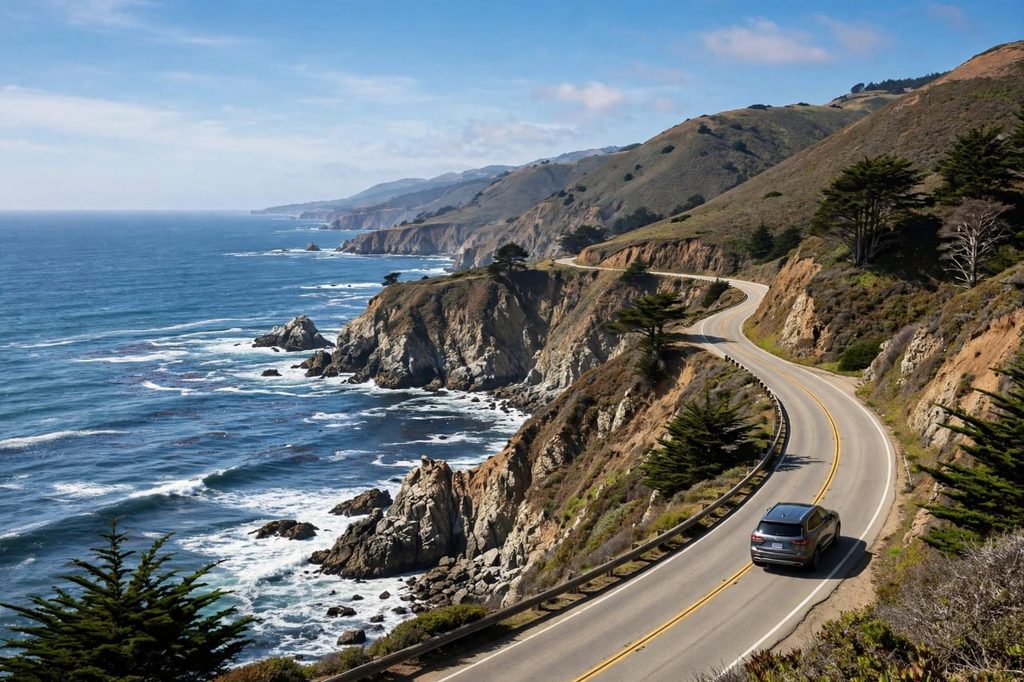
This is the most beautiful drive in America. Drive slow. Stop at Bixby Bridge. Stop at Pfeiffer Beach. Do not rush. Stay in a small motel in Big Sur or Monterey. The sunset here is something you will never forget.
Day 3: Big Sur to Monterey to Santa Cruz – 2 Hours Drive
Visit Monterey Aquarium in the morning. It is a bit expensive, but worth it if you have kids. In the afternoon, drive to Santa Cruz. Walk on the beach boardwalk. Very family-friendly.
Day 4: Santa Cruz to San Francisco – 1.5 Hours Drive
Drive to San Francisco. Visit Fisherman’s Wharf. Take a photo of Golden Gate Bridge. Eat clam chowder. Stay in San Francisco.
Day 5: San Francisco – Free Day
No driving. Just explore the city. Ride a cable car. Visit Chinatown. Or just rest. This is your buffer day.
Total driving: Only about 9 hours in 5 days. That is it. You see so much, but you are never tired. This is what a good planner does.
Best Free Road Trip Planner Tools in 2026
I have tested many tools. Here is my honest review – what is good and what is bad.
1. Google Maps – Best for Beginners
Pros: Free, easy, everyone knows how to use it. You can save stops, share with family.
Cons: It does not help you plan multi-day trips. It just shows one route at a time. You have to do the day-by-day planning yourself.
2. Google My Maps – My Personal Favorite
Pros: Totally free. You can create your own map with different colors for Day 1, Day 2, Day 3. You can add notes like “Good pizza here” or “Free parking here.”
Cons: A little tricky to learn at first. Takes 15 minutes to understand.
3. Roadtrippers (Free Version)
Pros: Shows you cool, weird places you would never find on Google. Like the world’s largest ball of twine, or a hidden waterfall.
Cons: Free version only allows 7 stops. If you want more, you have to pay. And it pushes you to upgrade a lot.
4. A Simple Notebook or Google Sheets
Pros: Honestly, this is what I still use most. A simple sheet with columns: Day, Drive, Stay, See, Eat.
Cons: No map. You have to check distances yourself.
My honest advice? Do not overthink the tool. The tool does not make the trip good. Your decisions do. Pick Google Maps + a simple notebook, and you are ready. I have seen people spend 3 weeks choosing the perfect app, and then they never go on the trip. Do not be that person.
Free Road Trip Planner vs Paid Planner – Which Is Better?
This is a question I get a lot. Should I pay for a planner?
Here is the truth:
Free Planner Is Best If:
You are going on a trip of less than 10 days, you are staying in the USA, you are comfortable using Google Maps, and you do not need automatic hotel booking.
Paid Planner Is Better If:
You are planning a 30-day cross-country trip with 20 stops, you need to manage a big group, or you want everything to sync automatically.
For most families, couples, and solo travelers, free is enough. I have done a 14-day trip from Texas to Colorado with just free tools, and it was perfect. Save that $50 for gas and good food instead.
But one warning: Free tools will not warn you about road closures, national park reservations, or seasonal closures. You have to check those yourself on the official NPS website. I missed Antelope Canyon once because I did not know I needed a tour booking in advance. That was my mistake, not the tool’s.
7 Mistakes That Ruin A Road Trip (I Made All Of Them)
- Driving Too Much: I once drove 11 hours in one day. I was so tired I could not enjoy the next day at all. Never again.
- Not Checking Gas Stations: In Nevada and Utah, gas stations can be 100 miles apart. Always fill up when you are at half tank.
- Packing Too Much: You do not need 5 pairs of shoes for a road trip. You need 2. Less luggage means less stress.
- No Snacks and Water: Always keep water and snacks in the car. In the desert, a small delay can become a big problem.
- Forgetting About Time Zones: Arizona does not follow daylight saving time like other states. I missed a tour because of this.
- Booking The Cheapest Hotel: The cheapest hotel is often far from everything, dirty, or unsafe. Read recent reviews, not just price.
- Trying To See Everything: You cannot see all of California in 5 days. Pick a few places and enjoy them properly. Less is more.
How Much Money Do You Need? A Quick Reality Check
A planner is not just about places, it is also about money. People always ask me, “Is a road trip expensive?”
Honestly, it can be both cheap and expensive. It depends on you.
A budget road trip for 2 people for 5 days can cost around $900 to $1,200 if you stay in motels, cook some meals, and drive your own car. A comfortable trip with nice hotels and restaurants can easily go to $2,500 or more.
My tip: Plan your food. Eating out 3 times a day for 7 days will kill your budget. Buy breakfast stuff from Walmart, make sandwiches for lunch, and eat out only for dinner. This one change saved me $300 on my last trip.
If you want to calculate your exact trip cost, you can check our Road Trip Cost Calculator on this site. But for this planner, just keep a rough daily budget in your mind and stick to it.
Road Trip Packing Checklist – Do Not Forget These
I keep this list on my phone for every trip:
- Driving license, car insurance, and ID
- Phone charger, power bank, and car charger
- Water bottles, snacks, and a small cooler
- Sunscreen, sunglasses, hat, and comfortable shoes
- First-aid kit and basic medicines
- Offline maps downloaded
- Hotel bookings printed or screenshot
- Cash – small towns sometimes do not accept cards
- Trash bags – keep your car clean, it makes the drive better
This small list has saved me many times.
Frequently Asked Questions About Free Road Trip Planner
Is there a truly free road trip planner with no sign-up?
Yes. Google Maps and Google My Maps are 100% free and need no extra payment. You can plan your full route, save stops, and share it with your family without paying anything.
How far in advance should I plan my road trip?
For a USA trip in summer, plan at least 3 to 4 weeks ahead. National parks, popular hotels, and rental cars get full very fast. For winter trips, 1 to 2 weeks is usually enough.
What is the best free road trip planner for families?
For families, I recommend Google My Maps + a simple sheet. Kids get tired fast, so plan short drives, add playgrounds and rest stops, and always book a hotel with a pool if you can. Happy kids mean a happy trip.
Can I plan a road trip without a car?
Yes, you can rent a car. But book it early. In 2026, rental car prices in summer are very high if you book late. Compare prices on 2-3 sites before booking.
How do I plan a road trip with pets?
If you are traveling with a dog, check in advance which hotels allow pets. Not all do. Also, never leave your pet in the car in summer, even for 5 minutes. The car gets dangerously hot very fast.
Final Thoughts – My Honest Advice
Look, I am not a travel expert who lives in a fancy office. I am just a person who loves road trips, made a lot of mistakes, and learned from them.
A free road trip planner will not make your trip perfect. There will still be traffic. There will still be a bad meal. There will still be a day when it rains when you wanted sunshine. That is life. That is travel.
But a good plan gives you one thing that money cannot buy: Peace of mind. When you know where you are going, you can actually be present. You can look out of the window. You can talk to your family. You can enjoy the music.
So, take 30 minutes today. Open Google Maps. Pick your start and end city. Write down your 5 days. That is it. You have just planned your trip.
And if this guide helped you, share it with one friend who is planning a trip. That is the best thank you for me.
Have a safe drive. Enjoy the open road. I will see you on the next trip.
Conclusion
A Free Road Trip Planner USA is the simplest way to turn a stressful drive into a beautiful memory. You do not need to pay for it. You just need to plan your days, drive less, book early, and keep one day free. Start with the 5-day California plan I shared above, and you will see how easy it really is. Plan smart, drive safe, and enjoy every mile in 2026 and 2027.
Pingback: PA Toll Calculator - Ultimate Guide 2026